150 ✓ In stock
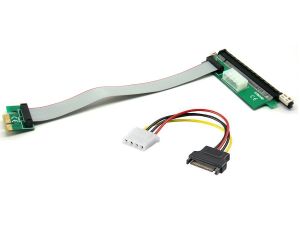
PCI Express Extension Cable 1x to 16x with Powered Riser Crypto Mining Cable
PCI Express Extension Cable 1x to 16x with Powered Riser / Molex. This cable is used for graphic cards specializing in Cryptocurrency and provides relief from the motherboard. Because they allow the cards to be placed in a custom setup, extension cables allow extensive reduced temperatures of your cards.
More Information
| Part # | PCI-E1X-16X-PWRX |
| Bar Code (UPC) | 794504722758 |
| Specifications | Overview: The PCI Express Extension Cable 1x to 16x with Powered Riser is designed to extend and enhance the connectivity of PCIe devices, particularly in cryptocurrency mining setups. This cable allows for the installation of PCIe expansion cards, such as graphics cards, at a greater distance from the motherboard, which is especially useful in mining rigs where optimal airflow and space management are crucial. The included powered riser ensures stable and sufficient power supply to the PCIe card, maintaining reliable performance and preventing power-related issues. Technical Specifications: Type: PCI Express Extension Cable with Powered Riser Cable Length: Typically 12 inches to 24 inches (varies by model) Connector A: PCIe 1x Male (to motherboard or PCIe slot) Connector B: PCIe 16x Female (for PCIe expansion card) Power Supply: 6-pin PCIe power connector (for additional power to the riser) Cable Gauge: 28 AWG (data) and 24 AWG (power) Design: Material: High-quality PVC insulation for durability and flexibility Connector Build: PCIe 1x Connector: Gold-plated connectors for reliable signal transfer and durability PCIe 16x Connector: Supports full 16x slot connections, providing compatibility with high-performance expansion cards Powered Riser: Includes a 6-pin PCIe power connector to ensure additional power is supplied to the expansion card for stable operation Cable Construction: Flexible design with reinforced shielding to minimize electromagnetic interference (EMI) and signal degradation Performance: Data Transfer Rate: Supports high-speed data transfer consistent with PCIe 1.0/2.0/3.0/4.0 standards, ensuring efficient communication between the motherboard and PCIe card Power Supply: The 6-pin PCIe power connector provides up to 75 watts of additional power to the PCIe card, ensuring stable operation even under high load Compatibility: Compatible with PCIe 1x slots on the motherboard and PCIe 16x expansion cards, making it suitable for various types of GPUs and other PCIe devices Applications: Crypto Mining: Ideal for cryptocurrency mining rigs where multiple GPUs are used, allowing for flexible placement and improved airflow Custom Builds: Useful for custom PC builds and modifications requiring extended PCIe slots Upgrades: Facilitates the addition of high-performance expansion cards in systems with limited space or for improved cooling solutions Key Features: Extended Connectivity: Allows PCIe expansion cards to be installed further from the motherboard, improving accessibility and airflow Powered Riser: Includes a 6-pin PCIe power connector to ensure additional power is provided to the expansion card for reliable performance High-Speed Performance: Supports PCIe data transfer speeds up to 32 GB/s (depending on PCIe version), maintaining efficient data communication Durable Construction: Made with high-quality materials and shielding to ensure long-lasting performance and minimal signal interference Flexible Installation: Designed to fit various configurations and setups, providing flexibility for different system designs Usage Notes: Connection: Attach the PCIe 1x male connector to the motherboard’s PCIe slot and the PCIe 16x female connector to the expansion card. Connect the 6-pin PCIe power connector to the power supply to ensure adequate power. Handling: Handle the cable and connectors with care to avoid bending or damaging the connectors and internal wiring Compatibility Check: Ensure that your motherboard, power supply, and expansion cards are compatible with the PCIe version and power requirements of the cable Additional Information: Safety Precautions: Avoid excessive bending or twisting of the cable to prevent damage. Ensure all connections are secure to avoid power or signal issues Connection Tips: Properly align and firmly insert all connectors to ensure stable operation and prevent disconnections |